
A destination is one place events are delivered: an address, a transport, a format, and its own disk cache.
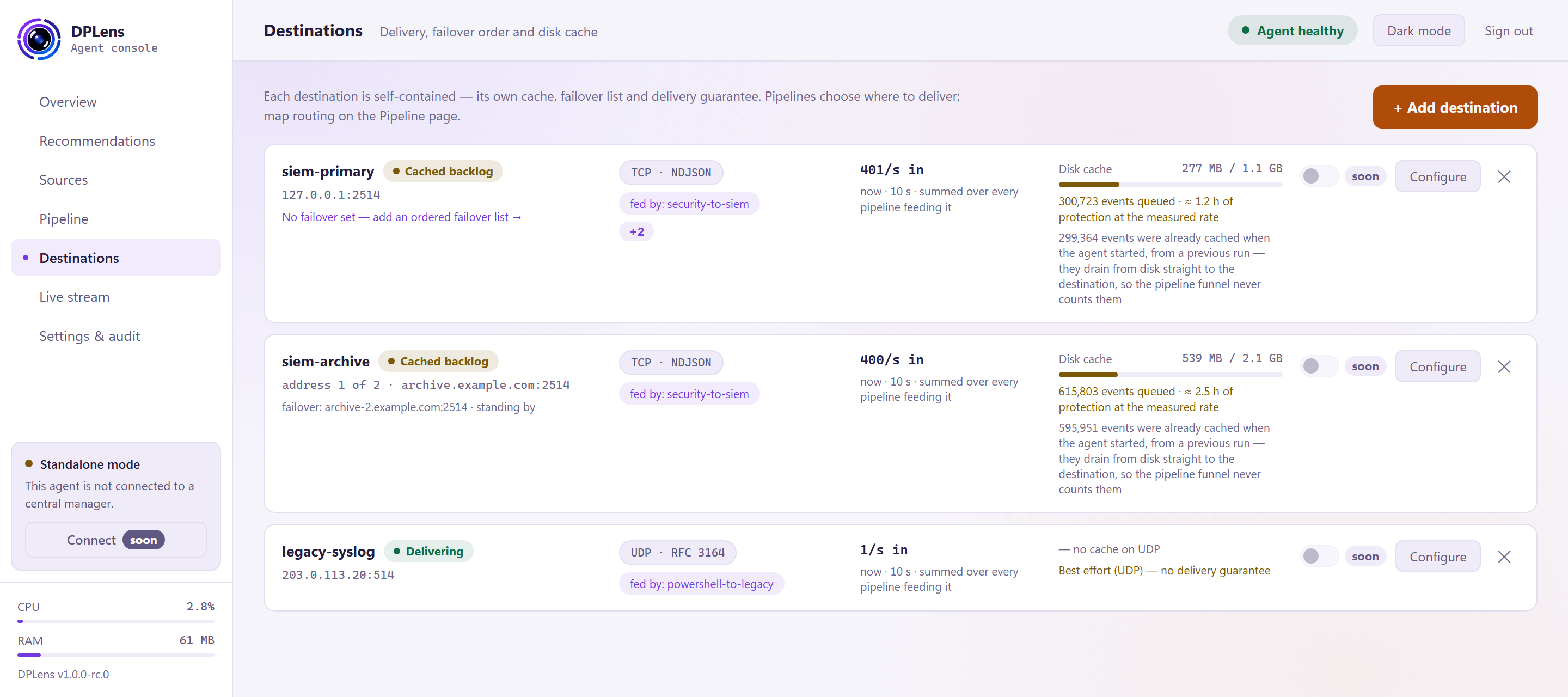
Each destination is self-contained. It has its own queue, its own failover list and its own delivery behaviour. Pipelines choose which destinations to feed; you map that on the Pipeline page.
Reading a card
| Name and state | The delivery state — see below |
| Address | Where it is sending, and which failover address is in use |
| Transport and format | For example TCP · NDJSON, or UDP · RFC 3164 |
| Fed by | Which pipelines deliver here |
| Rate in | Events a second arriving for delivery |
| Disk cache | How much is queued, against the cap you set |
Delivery states
The chip shows the most serious thing true of the destination, in this order:
| State | Meaning |
|---|---|
| Not applied | Staged but not yet applied |
| Not running | Not running — including when no enabled pipeline delivers here |
| No health yet | Running, but it has not reported yet |
| Fault: … | The receiver rejected something, named. A fault outranks everything below it, so a rejected token never reads as a mere backlog. |
| Failed over | Delivering to a failover address rather than the first one |
| Pool degraded (N of M) | Some members of an address pool are out of rotation |
| Cached backlog | Events are queued on disk and will be delivered when the destination catches up |
| Delivering | Events are being accepted |
The cache line
Where a cache is holding events, the card says how many, and how long that represents at the rate it is currently receiving. "533,296 events queued · about 1.9 hours of protection at the measured rate" is a far more useful number than a byte count.
After a restart, the card distinguishes events cached during this run from events that were already on disk from a previous one. The older ones drain straight from disk to the destination, so they never appear on the pipeline funnel again — they were counted the first time.
Failover
A card with no failover says so, with a link to add one. An ordered failover list means DPLens moves to the next address when the current one stops accepting, and moves back when it recovers and has stayed healthy for long enough to be trusted.
UDP
A UDP destination is labelled Best effort — no delivery guarantee, and the card shows no cache depth for it.
UDP has no acknowledgement: once an event is handed to the network, DPLens cannot know whether it arrived and cannot retry it. A packet lost in transit is lost silently, and no counter anywhere can tell you how many.
Use UDP only where the receiver requires it.
Adding a destination
+ Add destination opens the wizard.
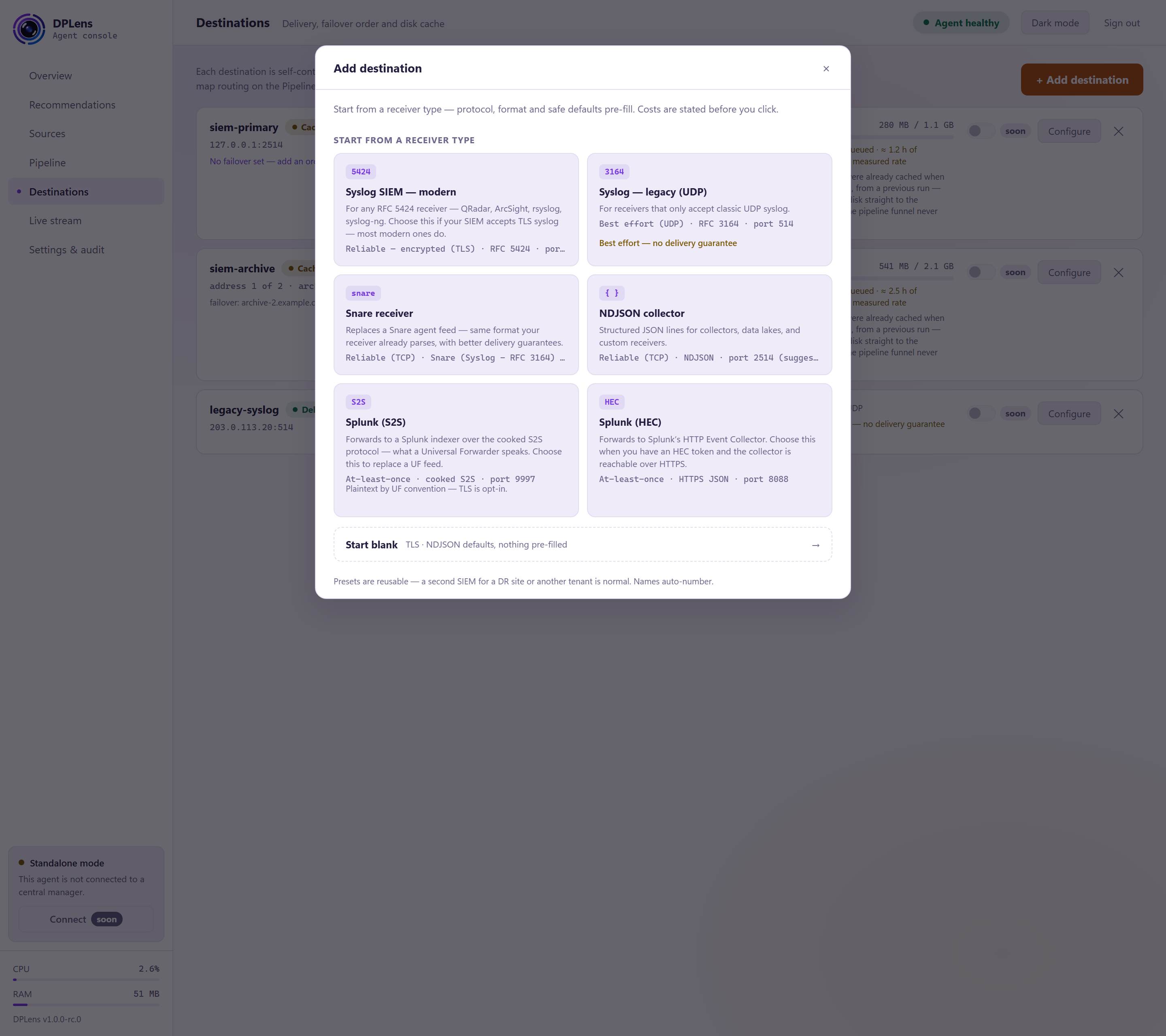
Start from a receiver type
| Preset | What it sets up |
|---|---|
| Syslog SIEM — modern | TLS, RFC 5424, port 6514 |
| Syslog — legacy (UDP) | UDP, RFC 3164, port 514 |
| Snare receiver | TCP, Snare records wrapped in an RFC 3164 syslog line, port 514 |
| NDJSON collector | TCP, newline-delimited JSON, port 2514 |
| Splunk (S2S) | The forwarder protocol, port 9997 |
| Splunk (HEC) | The HTTP Event Collector, port 8088 |
The preset fills in transport, port and format; you supply the address. You can change anything afterwards.
Delivery
| Setting | What it does |
|---|---|
| Transport | UDP, TCP or TLS |
| Address | host:port. The port fills in from the preset. |
| Failover addresses | An ordered list to fall back to |
Format
A row of chips: NDJSON, RFC 5424 syslog, RFC 3164 syslog, Snare, or raw. The Splunk types have their format fixed by the protocol, so the row is hidden.
See Choosing a destination for which to pick.
Outage
This is the section worth spending time on.
| Setting | What it does |
|---|---|
| Cache size | How much to hold on disk when the destination is unavailable. The page shows how many hours of your measured traffic that holds. |
| If the cache fills | See below |
| Keep free on the volume | Stop growing the cache while free space on the volume is below this. The volume is checked when events spill, never on the live path. |
If the cache fills:
| Choice | What happens |
|---|---|
| Pause collection until space frees | Stop collecting rather than lose anything. Windows holds the events. |
| Drop oldest | Keep the newest events; the oldest are discarded and counted. |
| Drop newest | Keep what you already have; new events are discarded and counted. |
There is no option that loses events without telling you. Whichever you choose, the count appears on the Overview.
Security
For TLS destinations. The Splunk types carry the same settings under Advanced settings instead, because their transport is fixed by the protocol.
| Setting | What it does |
|---|---|
| Validate server certificate | On by default. Turn it off only while testing — it disables the check that you are talking to the right server. |
| CA file | Your own authority's bundle. Omit to use the Windows trust store. |
| Server name | The name to present and verify against, if it differs from the address. Not used by the Splunk HTTP Event Collector destination. |
| Client certificate / key | For mutual TLS, given as secret handles. Set both or neither. |
Splunk metadata
For the two Splunk types, a section sets index, host, source and sourcetype — each as a fixed value or taken from a field on the event — plus per-source overrides where different sources should land differently.
See Sending to Splunk.
Advanced settings
Everything else: submission mode, framing, reconnection backoff, cache segment size, flush interval, and the acknowledgement window for destinations that support it. Defaults suit most deployments; every setting is listed in the configuration reference.
Testing it
Use Send test event from a source's row menu on the Sources page to push one event through to a destination, then watch it arrive on Live stream. That proves the whole path — collection, processing, masking, transport and format — before you rely on it.