
A pipeline takes one source, runs its events through the stages you choose, and delivers the result to one or more destinations.
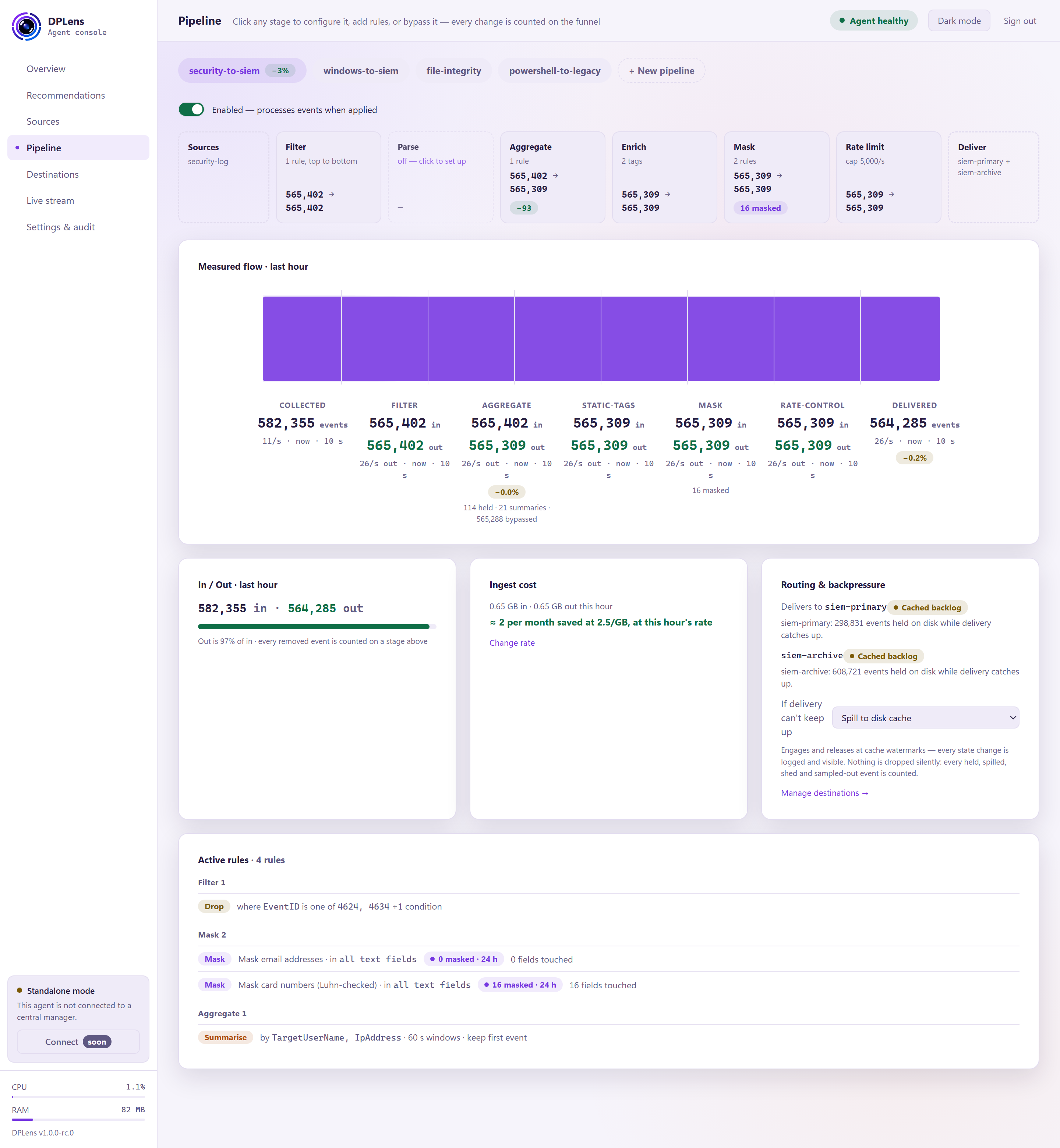
Each pipeline gets its own tab. + New pipeline creates another; up to 32 can run at once, each delivering to up to 8 destinations.
The switch under the tabs enables and disables the pipeline. A disabled pipeline stays in your configuration, is validated like any other, and starts the moment you enable it.
The stage ribbon
The row of stages from source to delivery. Each shows how many events went in and how many came out, measured, not estimated. Click one to configure it.
Stages always run in this order, whichever you configure:
| Stage | What it is for |
|---|---|
| Filter | Drop events you do not need |
| Parse | Turn raw text into named fields |
| Aggregate | Collapse repeats into one representative |
| Optimise | Drop fields whose value carries no meaning |
| Enrich | Add context — tags, host facts, public IP |
| Mask | Redact, hash or tokenise sensitive values |
| Rate limit | Cap how much leaves |
The order matters and is fixed for good reasons. Filtering first means later stages never touch events you are discarding. Aggregating before enrichment and masking means those run once per representative rather than once per duplicate. Optimising straight after that means an empty field is thrown away before anything else spends time on it — including the masking detectors, which would otherwise scan values that are about to be discarded. Masking runs last, before anything is written to disk or sent, so no unmasked value can reach the cache or the wire.
Measured flow, in and out, and cost
Three cards beneath the ribbon:
- Measured flow · last hour — the shape of the traffic through each stage.
- In / Out · last hour — totals, and out as a percentage of in.
- Ingest cost — what the reduction is worth at your cost per gigabyte.
Active rules
Every rule across every stage of this pipeline, in one list, so you can see what the pipeline actually does without opening every dialog.
Routing and backpressure
This card maps the pipeline to its destinations and decides what happens when one cannot keep up.
Destination mapping — tick the destinations this pipeline delivers to, up to eight, then Apply mapping. Each receives the same processed events.
If delivery can't keep up — the choice between:
| Option | What happens |
|---|---|
| Spill to disk cache (default) | Events queue in that destination's cache and are delivered when it recovers. Other pipelines keep running. |
| Pause collection at the source | Collection stops rather than queueing. DPLens drops nothing — Windows holds the events until it resumes, within the channel's own size. |
| Sample under pressure | Sample: keep one event in N and count the rest as dropped. |
Spilling is right when disk is cheap and you want everything. Pausing is right when disk is scarce. Sampling is the only one that deliberately discards, and everything it discards is counted on the funnel.
If several pipelines share a destination they must agree, because they share one queue. Pausing cannot be used with a destination that waits for the receiver to acknowledge.
The stage dialogs
Each stage opens on an overview — what it is doing now, and its rules — with a form for adding or editing one. Every stage also has an Advanced disclosure holding the settings that rarely need changing.
Filter
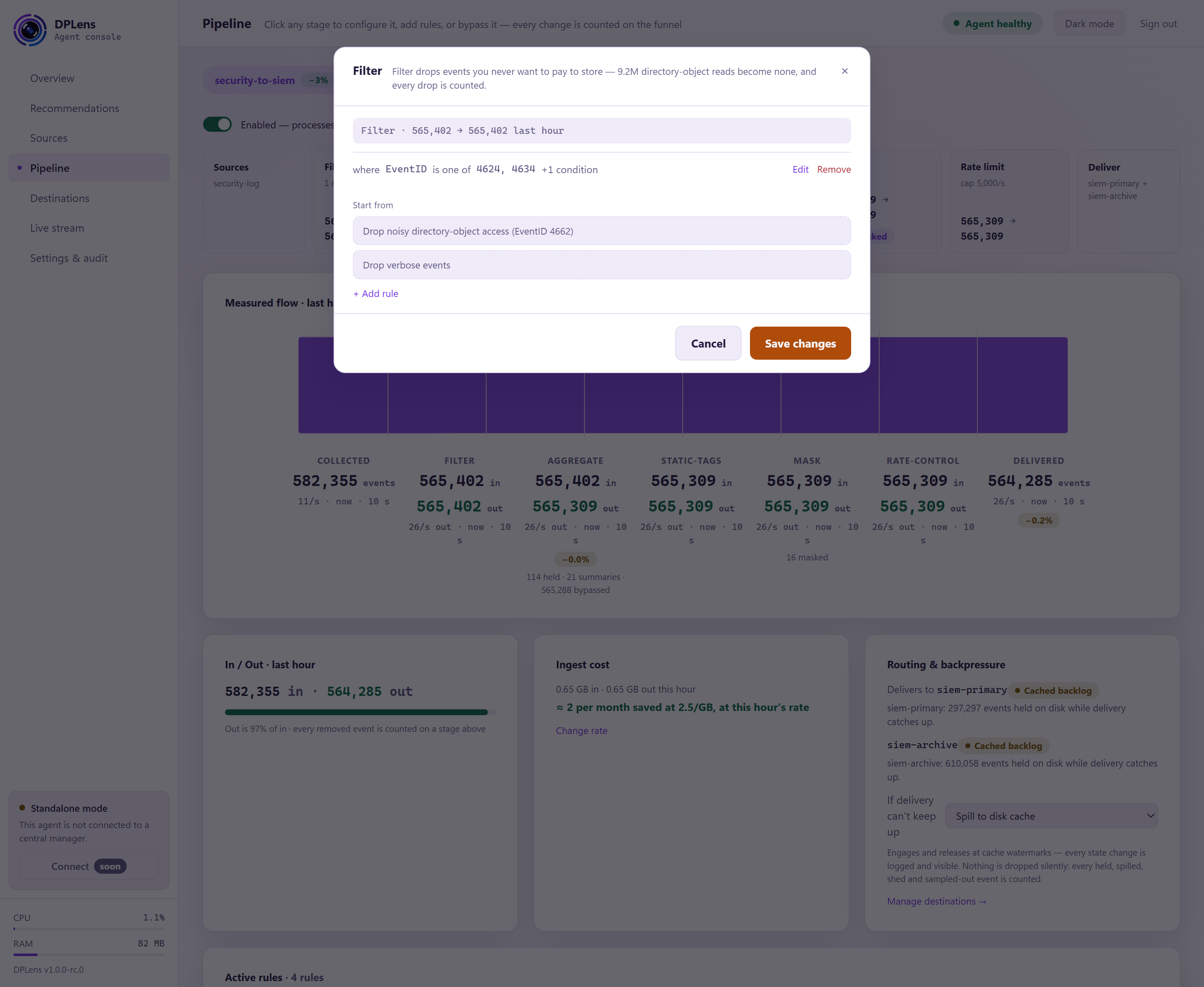
Rules are evaluated top to bottom, and each either keeps or drops what it matches.
The condition builder puts together tests without your writing anything: choose a field, an operator and a value, and group tests with all of, any of and not.
| Operator | Matches when the field |
|---|---|
| is / is not | Equals, or does not equal, the value |
| contains | Contains the text |
| matches | Matches a pattern |
| is one of | Equals any value in your list |
| is in network | Is an address inside a CIDR range |
| greater / less than | Compares numerically |
Patterns run on an engine that does not backtrack, so no pattern can be written that stalls the pipeline.
The cheapest event is the one you never send. If a whole event ID is of no interest, filtering it at the source is cheaper still — see Sources.
Parse
Choose the parser that matches your data: JSON, syslog, delimited (CSV and similar), key-value, or a pattern with named captures.
The same dialog also covers normalising field names to a common schema, so your SIEM sees consistent names whatever produced the event. Pick the schema and the map for your data, then use the remap rows to set, copy, rename, convert or drop individual fields.
A preview shows what your settings do to a sample event before you commit.
Events that fail to parse are routed, not silently discarded, so a format change surfaces instead of quietly costing you data.
Aggregate
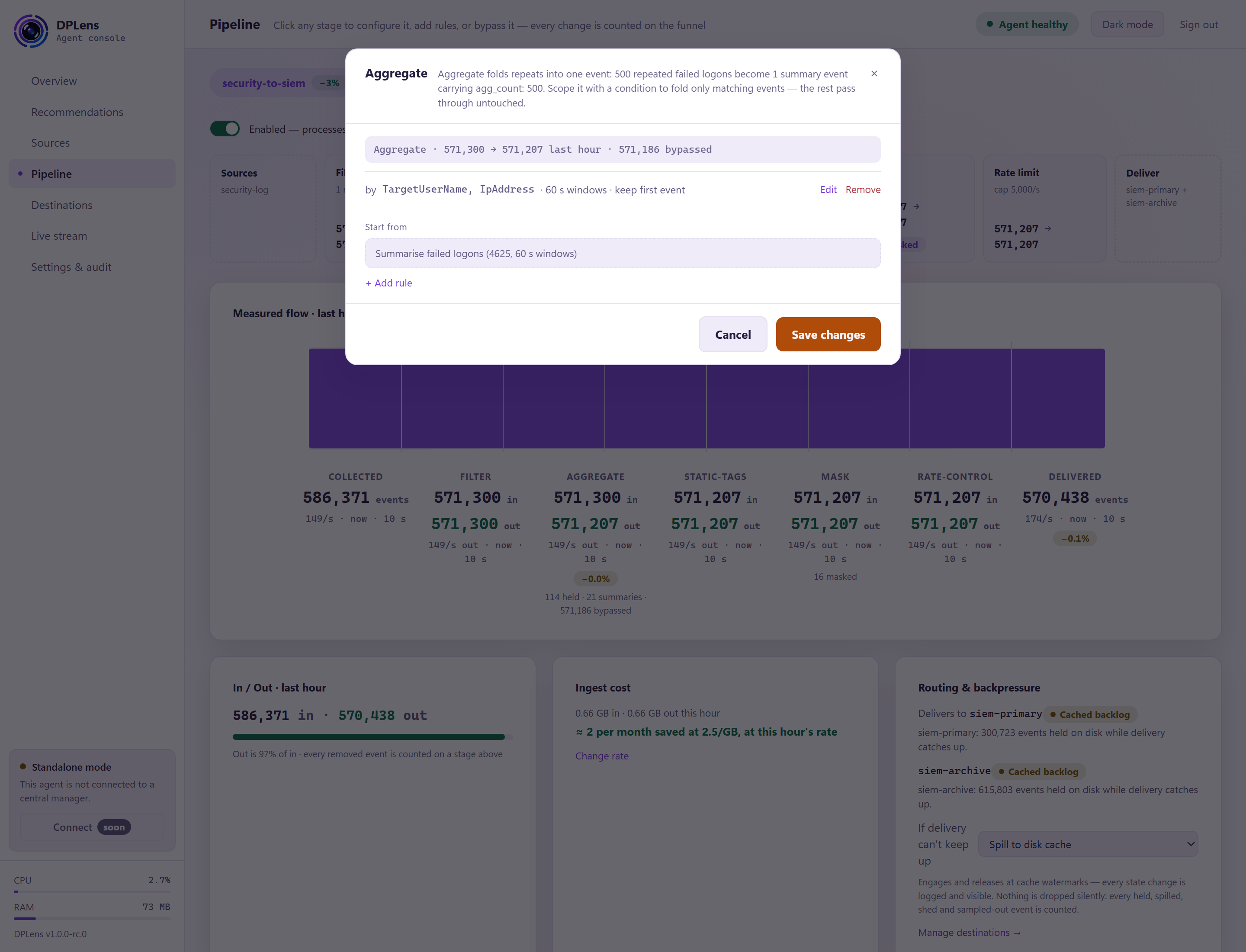
Collapse repeated events into one.
| Setting | What it does |
|---|---|
| Group by | The fields that make two events "the same" — a user and a source address, say |
| Window | How long to collect before emitting |
| Representative | Send the first of the group, the last, or none |
| Maximum groups | How many distinct combinations to track at once |
| Only when | An optional condition; events that do not match pass straight through |
When the group limit is reached, further groups pass through unaggregated and are counted — the number is on the funnel, so the limit is visible rather than a silent loss.
Optimise
A Windows security event carries dozens of fields whose value is a placeholder rather than a fact: TargetDomainName: -, TransmittedServices: -, SubjectLogonId: 0x0. Syslog, CSV, key-value and JSON sources contribute their own — N/A, null, none, (null), and the empty string. Every one of them is encoded, cached, sent, and — in most licensing models — ingested and billed by whatever receives it. None of them tells you anything.
Optimise removes any field whose value is on a list you choose. Tick the placeholders you want gone:
| Value | Matches |
|---|---|
| (empty) | A field with no value, or only spaces |
| - | A single dash — the most common Windows placeholder |
| N/A | Also n/a, NA, and the same with spaces around it |
| null / none / (null) | The text forms, not a real absent value |
| NULL SID / S-1-0-0 | The "no security identifier" placeholders |
| 0x0 | A zero identifier rendered as text |
| ? / -- | Unknown-value markers used by some sources |
You can add your own — up to 32 values in total, each up to 64 bytes (64 plain characters). Matching ignores capitals and any spaces around the value, so one tick covers N/A, n/a and NA .
Every checkbox starts off. Nothing is removed until you tick something and apply.
Three things worth knowing:
- Only text values match. A number, an address, a timestamp or a true/false value is a fact, and is never removed — a field that genuinely holds the number 0 stays.
- Every field is eligible, including the ones DPLens itself put on the event. If a field your searches rely on is sometimes a dash, decide whether you would rather see the dash.
- The stage exists only while something is ticked. Untick the last value and the stage leaves your configuration entirely.
The card and the funnel show what it did: how many fields were removed, and roughly how many bytes that saved. The byte figure is an estimate — it is what the removed keys and values measured, not a re-measurement of the wire — so it always appears with a ≈, and the cost card adds it to your saving rather than folding it into the "out" figure beside it.
To see the effect on a real record, apply the change and then use the Parse dialog's "Test with a sample". A value that is only ticked, and not yet applied, cannot be previewed.
In configuration-as-code, the stage is:
stages:
  - type: prune
    name: optimise
    prune:
      values: ["", "-", "N/A", "null", "0x0"]
It belongs after your parser, your schema mapping and any aggregation — those are what produce the fields it looks at — and before enrichment and masking. The console always places it there for you.
Enrich
Add context that makes an event searchable:
- Static tags — fixed key/value pairs on every event, such as a site or an environment.
- Host facts — machine name, domain, operating system, addresses, time zone, agent version. Choose which to add; they refresh periodically.
- Public IP — the address this machine appears as from the internet, looked up occasionally and cached. It is the one stage that makes an outbound call of its own, and it is off unless you enable it.
Mask
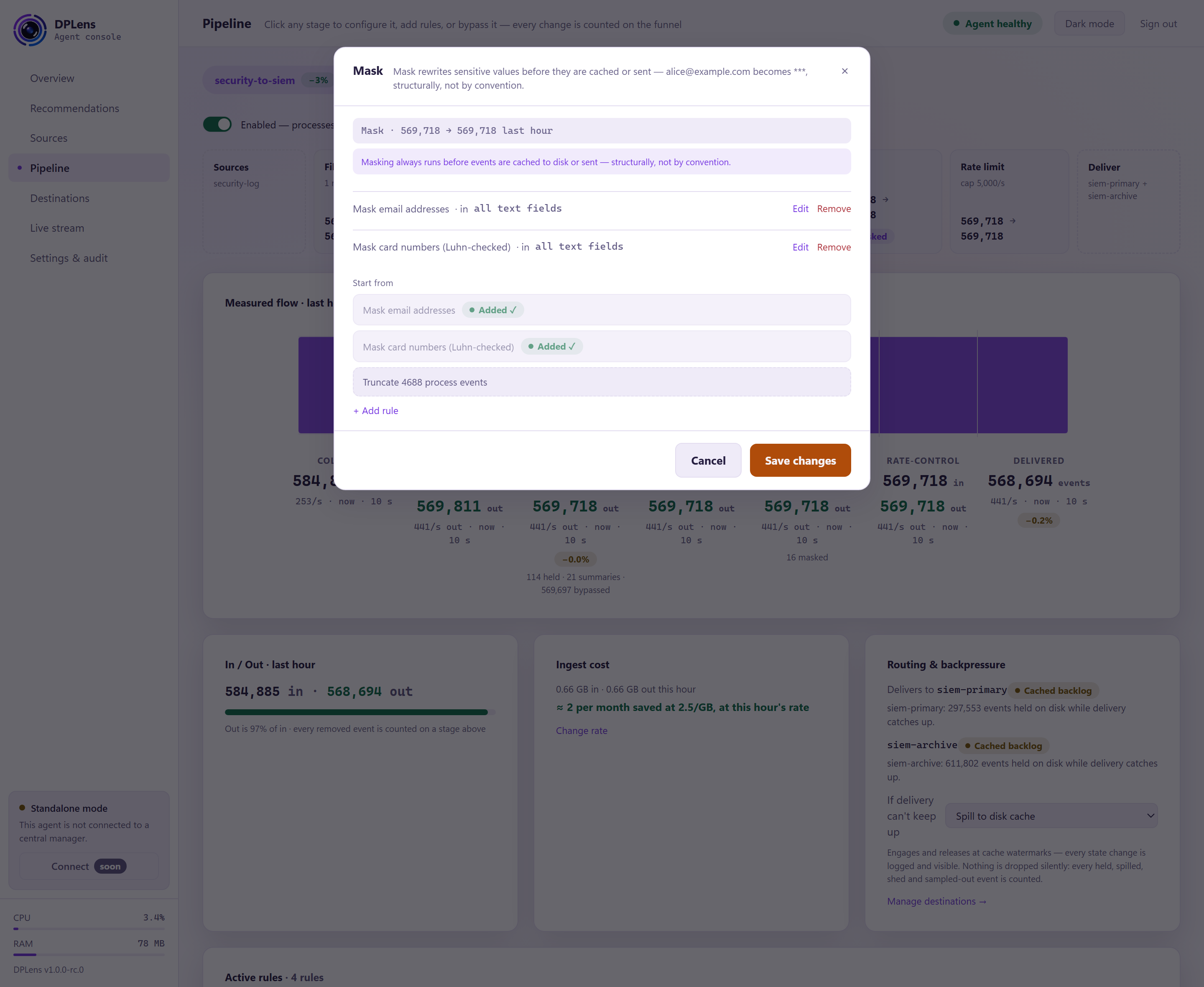
Masking rewrites sensitive values before events are cached or sent.
Each rule is a detector, the fields to search, and what to do with a match.
| Detector | Finds |
|---|---|
| Card numbers | Numbers that pass the Luhn check |
| Email addresses | |
| IPv4 / IPv6 | |
| US social security numbers | |
| UK national insurance numbers | |
| Phone numbers | |
| Pattern | Anything you can describe with a pattern |
| Action | Result |
|---|---|
| Redact | The value is replaced |
| Partial | All but the last few characters are replaced — enough to recognise, not enough to use |
| Token | Replaced with a fixed marker you choose |
| Hash | Replaced with a keyed hash: the same input always gives the same output, so you can still correlate, and the value itself is not carried. Treat hashed values of low-entropy data — national identifiers, card numbers, phone numbers — as pseudonymised rather than anonymised |
Hashing needs a secret, given as a handle. See How DPLens is configured.
Removing a masking rule asks you to confirm in a way that cannot be clicked through by accident: it changes what leaves the machine.
Every masking decision is counted and written to the audit log, so you can evidence what was redacted and when.
Rate limit
Cap what leaves.
| Setting | What it does |
|---|---|
| Events per second / Bytes per second | The sustained cap |
| Burst | How far above the cap a short spike may go |
| Buffer | How many events to hold while smoothing |
| Watermarks | Shedding starts at the high mark and stops at the low one |
| Policy | Which events to shed: newest first, or sample one in N |
This is the stage that protects a licence or an indexer from one machine that has started shouting. Use it deliberately — it discards events — and watch the count on the funnel.